

If you’ve spent any time coding lately, you’ve probably heard developers raving about Cursor AI. It’s not just another code editor with autocomplete bolted on; it’s built from the ground up to feel like you’ve got a genuinely sharp pair programmer sitting next to you, one that reads your entire codebase before it opens its mouth.
At its core, Cursor AI is an AI-first code editor, forked from VS Code, designed to help you write, understand, and fix code faster. Instead of bouncing between your editor and a chatbot tab, everything happens in one place: you ask, it answers, and it can even make the edits for you.
In this one, we’ll get into what Cursor AI actually is, what it can do, why developers are switching to it, and how you can start using it yourself, plus where it stands on pricing if you’re wondering whether the free plan is enough.
What Is Cursor AI?
Cursor is an AI-assisted code editor based on VS Code. That’s why, if you are familiar with VS Code, you’ll immediately notice how alike these two programs are. The difference is in their core.
While Cursor treats AI as an integral part of its core functionality, regular VS Code is just an advanced code editor without such a component. Cursor knows everything about your entire project, and that’s why, when it tries to give you any advice, it takes information not only from your current document but also from the whole project itself.
Cursor can support multiple AI models so that you won’t be limited to the ideas of a single provider. Moreover, it will easily work with both small script files and large multi-file projects.
If you’re curious about how this fits into the bigger picture of AI-powered business operations, it’s part of a broader shift where teams are using AI not just to assist with single tasks, but to speed up entire workflows, coding included.
Features of Cursor AI
There are many features that come with Cursor, but these are the few which make a real difference while using Cursor AI features :
- Coding via chat : Ask for an explanation or changes in your code while working in the editor itself.
- Multi-file editing : Edit multiple files simultaneously without needing to switch from tab to tab.
- Understanding of codebase context : It understands the project structure and therefore provides suggestions according to your existing codebase context.
- Inline code generation : Write your comment in your code regarding what you want, and Cursor generates code in the place of the comment.
- Smarter autocompletion : More than suggesting one line of code, it predicts full blocks according to what you are building.
- Detection and fixing bugs: It detects bugs and suggests solutions accordingly.
- Supports various models : Use various models according to the needs of a particular task.
Everything discussed above integrates very well together because every single feature of Cursor is built on the basis of reducing friction with coding via artificial intelligence.
Benefits of Using Cursor AI
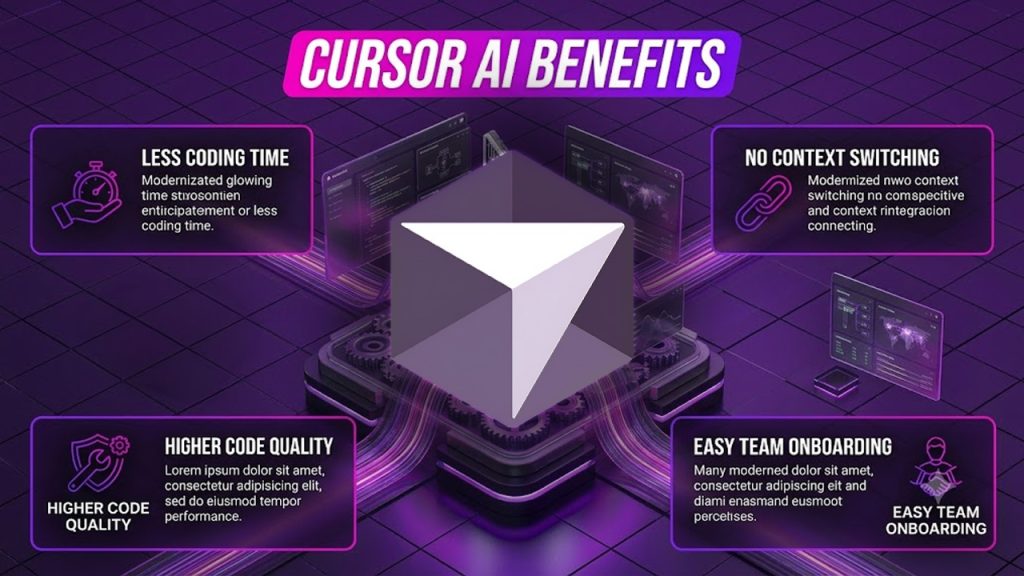
Once the novelty wears off and you get used to Cursor, the true value of the tool isn’t really in individual functions but rather in how little friction it introduces to your workflow:
Less time spent coding:
No need to write boilerplate anymore or look up solutions on Stack Overflow when you’ve already done it once.
Fewer switches :
the whole experience is integrated within your editor; you don’t need to switch to a separate chat window with an AI.
Higher quality of code :
Bug detection and fixing prevent mistakes from becoming bigger issues in the future.
Onboarding made easy :
A new developer could ask an AI to explain an unknown part of a codebase without having to find who wrote it.
Works with big projects :
Functions well both on simple scripts as well as on complex multifile applications.
Use Cases: Who’s Actually Using Cursor AI
Cursor isn’t just for one type of developer: it flexes depending on what you’re building and how experienced you are:
- Solo developers and freelancers : Move faster on client projects without needing a second pair of eyes on every line.
- Startups with small teams : Cover more ground with fewer engineers by leaning on AI for the repetitive parts of the job.
- Large engineering teams : use it to keep code quality consistent across bigger, messier codebases with many contributors.
- Students and new developers : Learn by asking the AI to explain code rather than just copying answers from a forum.
- Open-source contributors : Get up to speed quickly on unfamiliar repos before making a first contribution.
Whether you’re shipping a personal project on the weekend or working inside a codebase that’s been growing for years, the way you use Cursor tends to look pretty different, but the core value, saving time and reducing guesswork, stays the same across all of them.
Limitations of Cursor AI
Cursor might seem perfect at first, but there are still some limitations when it comes to this AI that you should consider before relying solely on it.
First of all, Cursor remains an AI, which means there could be mistakes in suggestions from time to time. In addition to that, these suggestions might be confidently wrong in some cases, so it is better not to believe Cursor blindly. Also, many heavy functions of Cursor are based on cloud processing, which means that an unreliable internet connection can significantly affect the performance of Cursor.
Cost is another important aspect to consider. Although the free version is quite sufficient for trying out this AI tool, some of its most useful features will be available only to paying customers, so those who use Cursor intensively will have to pay sooner or later.
But this information does not make Cursor a useless tool; it only shows that you should go into it with realistic expectations.
How to Use Cursor AI
Getting started is simpler than with most AI tools, mainly because it doesn’t ask you to learn a new interface from scratch.
Head to the Cursor AI download for your operating system; it’s available for Windows, Mac, and Linux. Installation works just like any other code editor; there’s no complicated setup process or configuration files to wrestle with before you can start using it.
Once it’s installed, you can either import your existing VS Code settings and extensions in a couple of clicks, or start fresh if you’d rather set things up your own way. From there, opening a project works exactly like you’d expect: point it at your folder, and it loads up with the full context of your codebase already in place.
To actually use the AI features, you’ll mostly work through the chat panel or inline prompts. Ask it to explain a function, request a change across multiple files, or just start typing a comment describing what you want and let it generate the code. There’s no steep learning curve here; most developers pick up the basics within their first hour of using it.
Cursor AI Pricing: What It Actually Costs

If you’re wondering whether you can get away with the free version, here’s the honest breakdown.
Cursor runs on a credit-based system, meaning each paid plan comes with a monthly credit pool matching its price, and that pool drains faster or slower depending on which AI model you pick.
Hobby (Free) : Limited Tab completions and a small number of agent requests each month. Good for kicking the tires, not for daily work.
Pro ($20/month) : Unlimited Tab completions, access to frontier models, and a $20 credit pool for premium requests. This is where most working developers land.
Pro+ ($60/month) : Same features as Pro, just roughly 3x the usage credits, for people who blow through Pro’s pool before the month ends.
Ultra ($200/month) : The heaviest tier, offering around 20x Pro’s usage along with priority access to new features.
Teams ($40/user/month) : Everything in Pro, plus centralized billing, admin controls, and privacy settings built for company use.
Enterprise (Custom) : Adds pooled usage, invoice billing, and dedicated support, with pricing worked out directly with Cursor.
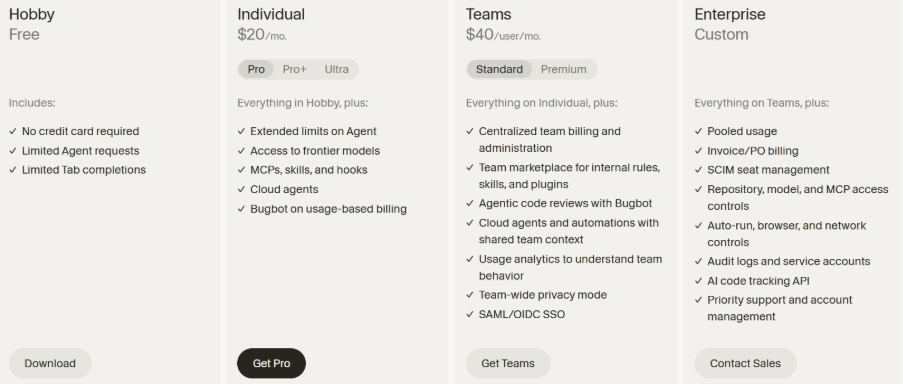
Understanding Cursor AI pricing upfront helps you avoid the surprise of hitting a limit mid-project, especially if you’re relying on it for daily work rather than occasional use. Most solo developers find that Pro at $20 a month hits the sweet spot, with enough headroom for daily coding without paying for capacity they’ll never touch.
Conclusion
Overall, Cursor AI is not attempting to replace developers but rather to get rid of the elements of coding that do not contribute to the process yet require lots of effort and time from developers. Whether it’s writing boilerplate, bug hunting, or explaining strange code to a newcomer, Cursor AI provides developers with sufficient amounts of help to focus on other aspects of their job.
Is it a flawless product? Not entirely, there are certain cons of the service, such as the need to check all the suggested pieces of code and the overall price if a person is going to use it quite often. However, considering the amount of time that can be gained in return, most people will find using Cursor AI to be a worthy choice.
In case someone is interested in how AI technology affects other sectors of the IT industry, it is worth mentioning the fact that Janitor AI performs the same task in other spheres of the internet.
No matter whether a person wants to try a Hobby version for free or go right to Pro, trying it out yourself is the best way to know if it fits your workflow.
Frequently Asked Questions :
Q. What is Cursor AI?
Cursor AI is an AI-powered code editor built on VS Code, designed to help developers write, understand, and fix code faster using built-in chat, multi-file editing, and codebase-aware suggestions.
Q. Is Cursor AI free to use?
Yes. Cursor’s Hobby plan is free with no credit card required, though it comes with limited Tab completions and agent requests. It’s enough to evaluate the tool, not enough for daily professional use.
Q. How do I get the Cursor AI download?
You can download Cursor directly from its official website for Windows, Mac, or Linux. Installation works like any standard code editor, and you can import your existing VS Code settings in a couple of clicks.
Q. What are the main Cursor AI features?
Chat-based coding, multi-file editing, codebase-aware context, inline code generation, smart autocomplete, and bug detection are among the standout features that set it apart from a typical editor.
Q. How much does Cursor AI cost?
Pricing ranges from free (Hobby) to $20/month (Pro), $60/month (Pro+), $200/month (Ultra), and $40/user/month (Teams), with custom Enterprise pricing for larger organizations