Choosing between the two market-leading AI platforms is not easy anymore, and that is precisely why ChatGPT vs Gemini comparison is important currently. Both platforms began as standard text assistants and scaled into multimodal and full-fledged AI platforms that are capable of coding, writing, reasoning, and even creating videos and images. OpenAI’s ChatGPT and Google’s Gemini have dominated the market and have emerged as close competitors.
The gap that once differentiated them on raw capabilities has considerably narrowed. What differentiates them currently is how they operate, where they exist in your current tech stack, and the range of tasks each manages best. In this guide, let us break down the ChatGPT vs Gemini debate across pricing, features, and daily use, so you can make the best choice as per your precise workflow instead of marketing claims.
ChatGPT Vs Gemini: Understanding the Basics
What Is ChatGPT?
ChatGPT is a conversational AI assistant of OpenAI, powered by the GPT model family. It takes care of coding assistance, text creation, document analysis, image generation, voice conversations, and web-based research, all from one chat interface. ChatGPT is broadly utilized across customer support, writing, software development, and general research tasks, and it connects to a wide set of third-party applications, including Microsoft tools such as SharePoint and Outlook.
Gemini is an AI assistant built by Google, powered by the Gemini model family. It is specialized around native multimodal understanding, implying that it can process images, text, audio, and video from the same prompt. Gemini is closely woven into the environment of Google, so it can extract data from Gmail, Docs, Drive, Maps, and YouTube without you having to leave the conversation. For anyone who is already using Google Workspace, this integration is one of the biggest selling points of Gemini.
ChatGPT vs Gemini: Quick Comparison Table
| Feature | ChatGPT | Gemini |
| Developer | OpenAI | |
| Popular for | Reasoning, coding, and writing quality | Ecosystem integration, multimodal input |
| Image generation | Yes | Yes |
| Video generation | Discontinued from April 2026 | Yes (Veo) |
| Music generation | No | Yes (Lyria) |
| Ecosystem integration | Microsoft apps, more than 140 third-party tools | Drive, Gmail, Docs, Maps, and YouTube |
| Free tier | Yes, but usage is limited | Yes, but usage is limited |
| Paid plans | Multiple tiers, beginning around $20/month | Different tiers, beginning around $20/month |
| Coding & agentic tools | Atlas browser, ChatGPT agent, Codex browser | Gemini Agent (Gemini Spark), Google Antigravity |
ChatGPT Vs Gemini: Core Features Compared
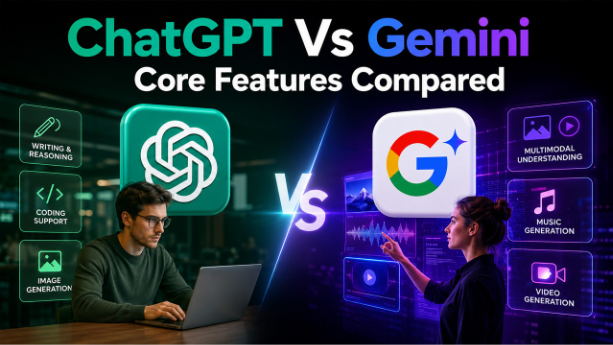
As far as the quality of raw input is concerned, ChatGPT vs Gemini debates often hinge on a few patterns observed consistently:
Writing and Reasoning :
ChatGPT has a tendency to create more structured and polished prose and manage multi-step logical reasoning with less errors, making it an effective choice for long-term technical explanations and long-form content.
Multimodal Understanding :
Gemini clearly edges here. It processes images, video, audio, and PDFs natively, which is valuable for anyone working across mixed media instead of plain text.
Coding support :
ChatGPT presently holds a much stronger position in agentic coding platforms, with more mature adoption among developers. Gemini is comparatively more competitive for simple coding tasks and benefits from deeper Google Cloud integration.
Creative generation :
ChatGPT is known for image creation, while Gemini further extends into music and video creation, providing creators with a wider toolkit inside one application.
If your work leans on visual content creation already, it is worth exploring how AI image generators compare across the broader market and combine with a workflow tool such as Google Flow’s Storyboard Studio if you are developing video projects. Google also has rolled out avatar features closely associated with Gemini itself, covered in detail in this Google Gemini Avatar Beta tutorial, which is a great example of how multimodal capabilities of Gemini convert into actual production tools.
Pricing and Environment Fit
Both platforms provide a usable free tier, followed by a mid-level paid plan priced closer to one another, and a premium plan focused on heavy users and businesses. Neither pricing structure can be considered dramatically cost-effective than the others at the entry level, so cost alone should not be the key deciding factor in ChatGPT vs Gemini decision.
The actual difference is in how it suits different environment:
- Select ChatGPT if you depend on a mix of non-Google applications, require robust agentic and coding features, or need the most polished writing output for content creation.
- Choose Gemini if you are already using Google Workspace, need to extract real-time data from Drive, Gmail, or Maps mid-conversation, or require greater multimodal capabilities such as audio and video analysis.
If your business is assessing wider AI business solution apart from just a chatbot, it is worth reading about a broader of platforms in this AI business solutions guide, which encompasses where general-purpose assistants such as Gemini and ChatGPT sit alongside more purpose-built enterprise tools. And if visual output is important to your workflow, this detailed guide on free AI image generators can be a valuable read.
ChatGPT Vs Gemini Verdict: Which One Is Better?
There is not a single right answer to ChatGPT vs Gemini — the best choice entirely depends on your available tool set and priorities:
- Developers, writers, and teams that focus on coding support and polished output often choose ChatGPT.
- Teams that are already using the environment of Google, or the ones working extensively with video, images, and audio, derive better value from Gemini.
Modern teams utilize both the tools, switching between them as per the task instead of exclusively committing to one. For a wider look at how such tools align into a complete AI-driven workspace, explore AIsuites.ai as it is a role-based alternative that centralizes search, chat, image, and video tools together in a single place.
Conclusion
The detailed ChatGPT vs Gemini comparison in 2026 is not about choosing a clear winner. It is about aligning the tool to your workflow. ChatGPT emerges as a good choice for reasoning, writing quality, and coding, while Gemini’s strengths are Google ecosystem integration and multimodal capability. Both are quickly evolving, and characteristics that feel like a gap today may not be a gap in the future. The smartest approach is to test both the tools in your daily workflow, compare the outputs side-by-side, and then make a decision on what is the best choice for your work instead of headline claims.
Frequently Asked Questions :
Which AI platform should you choose, Gemini or ChatGPT?
Neither can be considered a universally better choice. ChatGPT leads in terms of writing quality, reasoning, and coding, while Gemini is a top-choice in multimodal capability and Google environment integration. The best choice relies on your present workflow and tools.
What is a better option for coding: ChatGPT or Gemini?
ChatGPT presently holds a much stronger position with more mature tools for agentic coding, while Gemini is a competitive choice for straightforward coding tasks and benefits from in-depth Google Cloud integration.
Does ChatGPT or Gemini provide better multimodal support?
Gemini is clearly a better choice here, natively processing video, images, audio, and PDFs within the similar prompt.
Can ChatGPT create videos such as Gemini?
No. ChatGPT has discontinued video creation since April 2026, while Gemini continues to provide video generation through Veo.
Does Gemini or ChatGPT incorporate more effectively with available tools?
ChatGPT integrates with Microsoft apps and also other 140+ third-party tools, Gemini directly incorporates with Google Workspace apps such as Docs, Gmail, Drive, YouTube, and Maps.
Can I utilize both Gemini and ChatGPT together?
Yes. Numerous teams utilize both tools interchangeably. Selecting whether one aligns with specific tasks instead of committing to a single platform exclusively.