Introduction
Generating polished visuals demand designing skills, knowledge of the design software, and hours of manual effort. Leonardo AI has modified that equation by enabling anyone to enter a description and get a top-quality image in just a few seconds. Whether the objective is marketing visuals, game art, or concept sketches, Leonardo AI has emerged as one of the most reliable AI image generation solutions available today. In this blog, let us walk you through what is this tool, how it operates, its key features, and possible tools for getting the right results.
Understanding Leonardo AI Basics
Leonardo AI refers to an AI-driven image creation solution that transforms text prompts into completed visuals leveraging machine learning models. A user enters a description, like “a robot saving people in a tsunami,” and the platform creates an image that aligns with the request.
What differentiates Leonardo AI apart from the best AI image generator tools is its overall focus on consistency and control. Instead of creating a single random output, it enables creators to:
- Select from numerous pre-trained models for distinct styles of art.
- Optimize settings such as image size, negative prompts, and style.
- Train customized models on their own reference images.
- Ensure a consistent appearance across a whole group of assets.
This has led to the popularity of Leonardo AI among designers, game developers, marketers, and hobbyist artists who require production-ready and repeatable results instead of one-off experiments.
How Leonardo AI Operates?
Get started with Leonardo AI by following a simple and step-by-step process:
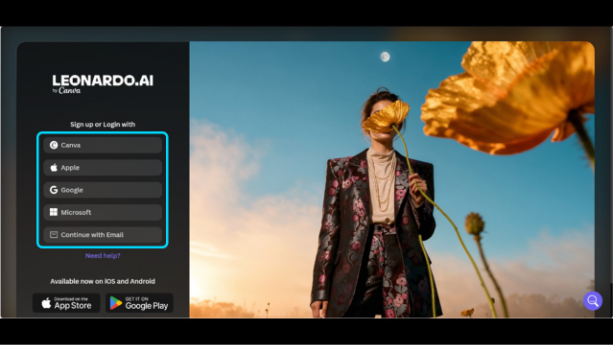
- Create an Account — Sign Up using Microsoft, Google, Apple, Canva, or an email address, then verify your account with the help of a code.
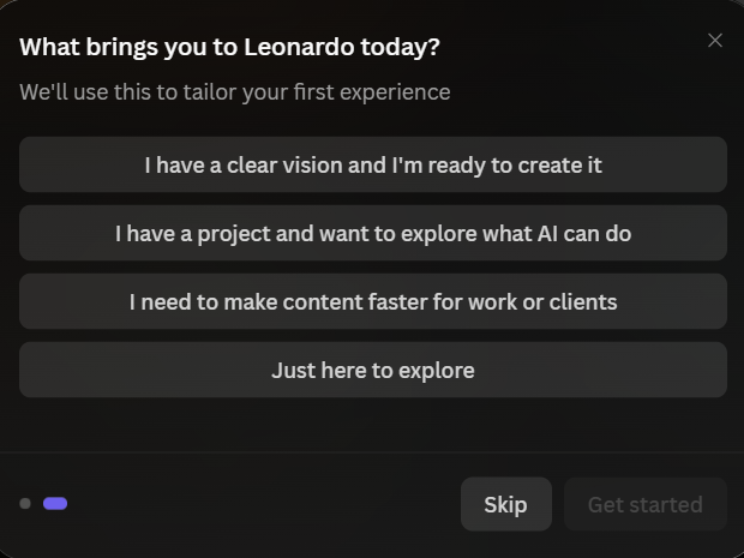
- Choose Your Purpose: From the given options, you can choose the purpose of using Leonardo AI. The platform will use this information to personalize your first experience. Once you select an option, select “Get Started.” Depending on the version of Leonardo AI you are using, you might or not might not be asked about more preferences.
- Write a Prompt — Go to the prompt box with the placeholder text “write a prompt here.” Then, provide a description of the visual, give details of style, subject, and mode.
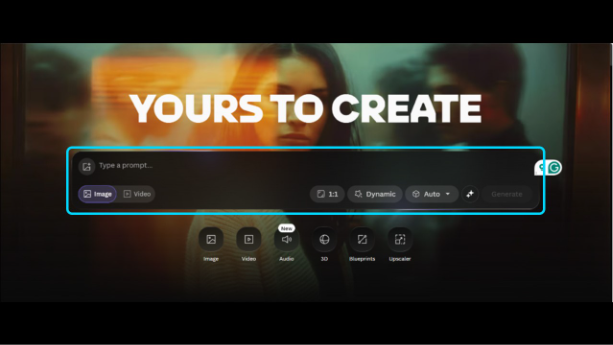
- Customize settings — Choose whether you need to create an image or video. Then, adjust style strength, image size, and negative prompts to prevent unrequired elements.
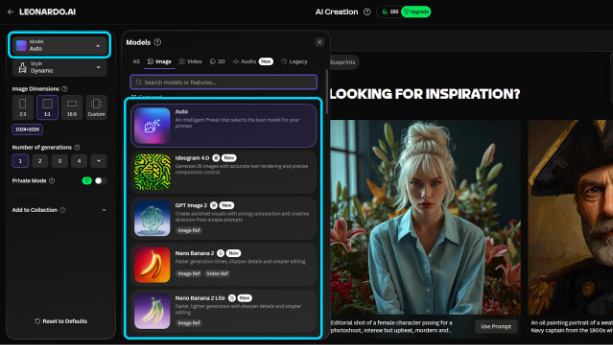
- Pick a model — Choose a pre-trained model fit for the required look, like anime, photorealistic, or cinematic. You can also set it to Auto, which will allow the tool to select a model automatically based on the prompt.
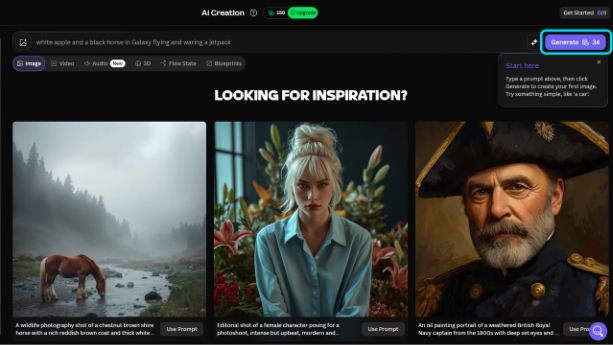
- Generate the image — Free accounts leverage a daily token allowance to generate images.
- Edit As Well as download — Optimize results through the in-built AI Canvas, then download or save the image privately on a paid plan.
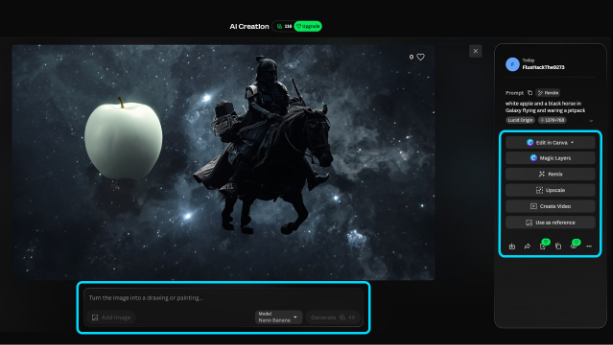
This workflow ensures Leonardo AI remain accessible to beginners while still providing sufficient depth for professionals who require tighter control over their output.
How to Get Better Results with Leonardo AI Prompts
The quality of your AI-generated images depends as much on your prompt as it does on the model itself. Instead of using short or generic descriptions, provide enough context to guide the AI toward your desired style and composition.
To improve your results:
- Describe the subject clearly before adding artistic styles.
- Mention lighting, camera angle, and background details.
- Include colors, textures, or moods to create a consistent visual style.
- Generate multiple variations before selecting the best output.
- Refine your prompt gradually instead of rewriting it completely.
- Save successful prompts so you can reuse them in future projects.
If you’re interested in experimenting with another image generation platform, Piclumen AI is worth exploring for comparison. Testing different tools can help you understand which one best matches your creative workflow and project requirements.
Strong prompts reduce editing time and make it easier to generate images that closely match your original vision.
Main Characteristics and Application Areas
Leonardo AI provides support to a broad range of creative projects, and its characteristics showcase its flexibility:
Main Features:
- Photorealistic image creation with robust accuracy of prompt.
- Custom model training, generally utilizing 8-15 reference images for brand-specific and consistent results.
- Style variety, including vintage, anime, and cinematic presents.
- Seed-driven reproducibility, enabling creators to recreate or change design instead of beginning from the start.
- AI Canvas for post-creation editing and refinement.
Common Application Areas:
- Game Asset Generation — props, characters, and environments for developers.
- Marketing Visuals — Ad creatives, product shots, and social media graphics.
- Concept Art — Early-stage exploration of visuals for studios and artists.
- Personal Art Projects — Hobbyist and Illustrations creations.
Also Read: Create AI Storyboard in Minutes with Google Flow Storyboard Studio
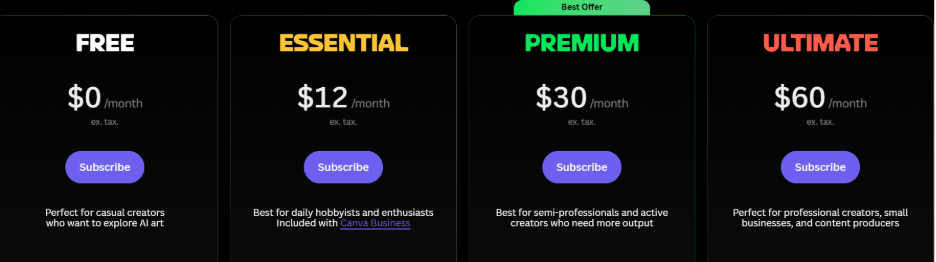
As far as pricing is concerned, Leonardo AI deploys a freemium model. Free users receive a limited daily token allowance, and generated images are by default public, while premium plans (beginning around $10/month) give you access to larger credit pools, private images, and quicker processing. This structure enables casual users to experiment at no cost while providing professionals with a scalable option as their requirements evolves. The four pricing plans are shown in the following screenshot.
Right Practices and Prevalent Limitations
Similar to any AI platform, Leonardo AI proves to be effective when it is utilized with an organized strategy:
Best Tips for Top-level Results:
- Write specific prompts that give instructions on color, style, and mood instead of vague descriptions.
- Leverage negative prompts to exclude unwanted elements, like blurry edges.
- Try out distinct models, including Leonardo Diffusion XL, for distinct aesthetics.
- Begin custom training with 8-15 curated reference images for balanced consistency.
Reliable Limitations:
- Free accounts pose limitations on routine tokens, and created images are public.
- It falls short in creating a clear and legible text within images.
- Overly complicated prompts can create inconsistent or cluttered results.
- Ownership terms and commercial use must be checked before professionally utilizing outputs.
If you are familiar with such constraints, it can allow creators to plan around them instead of being surprised in the middle of the project.
Conclusion
For creators who require a novelty image creator, Leonardo AI provides a practical balance of control, quality, and consistency. From game studios developing complete asset libraries to marketers creating quick campaign visuals, the platform adjusts to a broad range of creative workflows. By comprehending how Leonardo AI operates, its main features, and its present limitations, users can get more reliable and sharper results from the first day itself. They can then decide with confidence whether it aligns with their professional or creative requirements.
Common Mistakes to Avoid When Using Leonardo AI
Many new users expect perfect results from their first prompt, but AI image generation usually improves through experimentation. Avoiding a few common mistakes can save time and produce more consistent visuals.
Some of the most frequent mistakes include:
- Using vague prompts with very little detail.
- Ignoring aspect ratio and image resolution requirements.
- Generating too many variations without refining the prompt.
- Forgetting to organize projects and downloaded assets.
- Relying entirely on AI without reviewing the final output.
Creators developing digital characters or visual storytelling projects often compare Leonardo AI with Character AI to understand how image generation and conversational AI can complement one another in creative workflows.
Treat AI as a creative partner rather than a one-click solution. Small prompt improvements often lead to noticeably better results.
Frequently Asked Questions :
Q1. What is Leonardo AI mainly utilized for?
A- In Leonardo AI, you get key features in a single platform: image creation, image upscaling, image editing, video editing, and video generation.
Q2. Is Leonardo AI paid or a free tool?
A- Leonardo AI provides both paid and free options. In the free plan, you get a daily allowance of tokens to use it across video or image generation features. Your creations will be public, and usage will be restricted to standard features.
Q3. Is Leonardo AI safe to use?
A- Leonardo AI is a reputable, safe, and extensively used platform well-protected by security measures of industry standard, including GDPR and SOC2 compliance.
Q4. Which model of Leonardo AI is best?
A- Kino XL is a cinematic powerhouse of Leonardo AI. It creates dramatic wide-format compositions with film-like aesthetics and moody lighting. It is ideal for editorial illustration, concept art, and creation of narrative scenes where visual storytelling is the main priority.
Q5. Can you create top-quality AI videos with the help of Leonardo AI?
A- Yes, you can create top-level AI videos with the help of Leonardo AI. You get dedicated “motion” and “video” tools that empower you to manifest your creative ideas through still images and text prompts.